Essential Security Considerations for Web Applications

The security of web applications has become a critical concern in the digital age. As reliance on these applications grows for various personal and professional activities, the potential impact of security breaches increases significantly. The financial implications of such incidents are substantial, with the global average cost of a data breach reaching $4.88 million in 2024.1 Therefore, adopting a proactive security posture is no longer optional but a fundamental requirement for protecting sensitive information, maintaining user trust, and ensuring the uninterrupted operation of businesses. This report aims to provide a comprehensive overview of key security areas that extend beyond the immediate concern of storing API keys in the frontend, offering a holistic perspective on web application security best practices.
Understanding Common Web Application Vulnerabilities
Several common vulnerabilities can be exploited by attackers to compromise web applications. Understanding these threats is the first step towards building more secure systems.
Cross-Site Scripting (XSS) Attacks: Types, Impact, and Prevention
Cross-Site Scripting (XSS) attacks represent a type of injection where malicious scripts are introduced into otherwise trustworthy websites, ultimately targeting the users of those sites.2 These attacks are successful when a web application incorporates user-supplied data into its output without properly validating or encoding it.2 An attacker can leverage this flaw to send malicious code, typically in the form of a browser-side script, to unsuspecting users. The user's browser, unaware of the script's malicious intent, executes it because it appears to originate from a trusted source. This execution can grant the malicious script access to sensitive information such as cookies, session tokens, or other data retained by the browser.2
XSS attacks can be broadly categorized into several types. Reflected XSS occurs when the malicious script originates from the current HTTP request and is immediately reflected back to the user in the response.4 This often happens through error messages or search results that display user input directly. Attackers frequently deliver these attacks by crafting malicious links that, when clicked, send the injected code to the vulnerable website, which then reflects it back to the user's browser.3 The browser then executes the script, believing it came from the trusted server. As the simplest form of XSS, reflected attacks highlight the danger of directly including unvalidated request data in responses.4 Stored XSS, also known as persistent XSS, arises when the malicious script is permanently saved on the website's servers, for instance, in databases, message forums, or comment sections.4 When a victim requests the stored information, the malicious script is retrieved from the server and executed by their browser. This type of attack can be particularly harmful as the indirection through the data store can make the threat harder to identify, potentially affecting multiple users. An attacker might inject a malicious payload into a website's database through a vulnerable form, which is then executed when other users view the affected content.3 DOM-based XSS is a client-side vulnerability where the malicious payload is executed entirely within the user's browser by manipulating the Document Object Model (DOM) of a page.3 Unlike reflected and stored XSS, the vulnerability in DOM-based XSS resides in the client-side JavaScript code rather than the server-side code.4 This occurs when client-side scripts process data from an untrusted source and write it to the DOM in an unsafe manner.4 Finally, Blind XSS is a form of persistent XSS where the attacker's payload is saved on the server and reflected back to the victim from the backend application.2
The consequences of a successful XSS attack can range from minor annoyances to complete account compromise.2 Attackers can exploit these vulnerabilities to steal sensitive data such as cookies and session tokens, which can then be used to hijack user accounts.2 They can also redirect users to malicious websites, potentially leading to further exploitation.2 Furthermore, attackers can perform actions on behalf of the compromised user, potentially leading to unauthorized transactions or data modifications.4 In some cases, XSS can even be used to deface websites, damaging the reputation and trustworthiness of the application.3 The potential for severe consequences extends to scenarios like modifying press releases, which could affect a company's stock price, or altering dosage information on pharmaceutical sites, which could lead to overdoses.2
Preventing XSS attacks requires a multi-layered approach. Input filtering at the point where user input is received is crucial. Applications should filter as strictly as possible based on what is expected or valid input.4 However, filtering alone is not sufficient. Output encoding or escaping data at the point where user-controllable data is output in HTTP responses is equally important. This prevents the data from being interpreted as active content by the browser.3 Depending on the output context (HTML, URL, JavaScript, CSS), different encoding schemes may be necessary.4 HTML sanitization involves processing HTML input to remove or neutralize any potentially malicious code. Libraries like the OWASP HTML Sanitizer can be used for this purpose.3 Setting the HttpOnly flag for cookies prevents client-side scripts from accessing them, reducing the risk of cookie theft via XSS.3 Implementing a Content Security Policy (CSP) allows developers to control the resources that the browser is allowed to load for a particular web page, significantly limiting the potential impact of XSS vulnerabilities.3 Regular security scanning can help identify XSS vulnerabilities in the application.3 Finally, training developers and maintaining awareness about XSS risks and prevention techniques are essential for building secure applications.3
The existence of various XSS attack types necessitates a comprehensive defense strategy that addresses vulnerabilities on both the server and client sides. Relying solely on the security features of web development frameworks is insufficient, as even modern frameworks can have escape hatches or be used in ways that introduce vulnerabilities. Therefore, developers must be cognizant of these limitations and implement additional security measures like robust output encoding and HTML sanitization. An effective XSS prevention strategy hinges on a combination of rigorous input filtering and meticulous output encoding or sanitization. Depending on just one of these measures can leave the application vulnerable to bypass techniques.
SQL Injection Attacks: How They Work and Mitigation Strategies
SQL injection (SQLi) is a code injection technique that exploits vulnerabilities in applications that interact with databases.10 It occurs when attackers insert malicious SQL statements into database queries through input fields or other data entry points.1 This happens because the application uses user-provided input to create SQL queries without proper validation.11 A successful SQL injection attack can lead to unauthorized access to sensitive data, manipulation of database contents, and even the execution of administrative operations on the database server.10
SQL injection works by allowing unintended data to enter a program from an untrusted source, which is then used to dynamically construct a SQL query.10 Attackers craft malicious input that gets incorporated into these dynamic SQL queries, thereby altering the intended logic of the query.10 For example, by manipulating the WHERE clause of a SELECT statement, an attacker might be able to retrieve all data from a table, bypassing intended filters.11 In databases that support the execution of multiple SQL statements separated by semicolons, attackers can inject additional commands, such as deleting data from tables.11 Even in databases that do not allow batch execution, attackers can use similar techniques to inject and execute arbitrary commands.11 This exploitation of the lack of distinction between SQL commands (the control plane) and user-provided input (the data plane) is the fundamental mechanism behind SQL injection.
The impact of a successful SQL injection attack can be severe. Attackers can gain unauthorized access to sensitive data, including passwords, credit card details, and personal user information.1 They can also manipulate data within the database, leading to the insertion, update, or deletion of records.10 In some cases, attackers can even execute administrative operations on the database, potentially shutting down the entire DBMS.11 The severity can extend to remote code execution and the compromise of the underlying server.11 Furthermore, organizations that fall victim to SQL injection attacks often suffer reputational damage and may face regulatory fines due to the exposure of sensitive data.10
Preventing SQL injection requires employing secure coding practices. The most effective defense is the use of parameterized queries, also known as prepared statements.10 With parameterized queries, the SQL code's structure is defined first, using placeholders for the parameters or values that will be supplied at execution time. The actual values are then passed to the query separately. This method ensures that the database always distinguishes between code and data, regardless of the user input, thereby preventing malicious SQL code from being executed. While stored procedures can help by limiting the types of statements passed to their parameters, they do not provide complete protection against all forms of SQL injection.11 Allow-list input validation can be used to accept only characters from a predefined set of safe values for specific input fields.12 This is particularly useful for elements like table and column names where parameterized queries cannot be directly applied. Although escaping user-supplied input is a traditional approach, OWASP discourages its use as the primary defense because it is database-specific and prone to bypasses.12 Limiting the database permissions of the application to the minimum necessary (principle of least privilege) can also reduce the potential damage from a successful attack.10 Web Application Firewalls (WAFs) and Runtime Application Self-Protection (RASP) solutions can provide additional layers of defense by detecting and blocking malicious SQL queries.10 Finally, ensuring that the application does not expose detailed database error messages to end users can prevent attackers from gaining information that could aid in further exploitation.10
Despite the well-established prevention techniques, SQL injection remains a prevalent vulnerability, likely due to the presence of legacy code and insufficient awareness of secure coding practices among developers. While input validation plays a role in ensuring data conforms to expected formats, parameterized queries stand as the most robust method for preventing SQL injection when handling user-provided data values within SQL queries. Attackers can employ various types of SQL injection, including in-band, out-of-band, and blind techniques, highlighting the need for comprehensive security testing that covers these different attack vectors.
Cross-Site Request Forgery (CSRF) Attacks: Exploitation and Defense Mechanisms
Cross-Site Request Forgery (CSRF) is an attack that coerces an end user to execute unwanted actions on a web application in which they are currently authenticated.1 Attackers often use social engineering tactics, such as sending malicious links via email or chat, to trick users into performing actions of the attacker's choosing.20 If the victim is a normal user, a successful CSRF attack can force them to perform state-changing requests like transferring funds or altering their email address. If the victim holds an administrative account, CSRF can potentially compromise the entire web application.20
CSRF attacks function by exploiting the trust that a web application has in authenticated users. The attacker crafts a malicious request, which could be a specially constructed URL or a hidden form, that targets a state-changing function on the web application.20 The attacker then employs social engineering to induce the victim, who is already logged into the target application, to click on a link or submit the crafted form.20 Because the victim is authenticated, their browser automatically includes any session-related information, such as cookies, with the request.21 The web server, receiving a request that appears to come from a legitimate authenticated user, processes it without realizing it was initiated by the attacker.21 Examples of actions an attacker might force a victim to perform include transferring funds, changing account settings, or making unauthorized purchases.1 For instance, an attacker could embed a malicious image tag in an email; when the logged-in user views the email, the browser might automatically make a GET request to the bank's transfer endpoint, initiating an unauthorized transaction.23
The potential impact of CSRF attacks includes unauthorized actions being performed on behalf of the user, leading to fund transfers, password changes, or data modification.18 This can result in data breaches and the alteration of sensitive information without the user's consent.18 If the targeted user has elevated privileges, such as an administrator, a CSRF attack could lead to privilege escalation, allowing the attacker to perform administrative tasks.18 Furthermore, if a web application is found to be vulnerable to CSRF, it can suffer significant reputational damage.19
Several defense mechanisms can be employed to prevent CSRF attacks. One of the most effective is the use of synchronizer tokens, also known as anti-CSRF tokens.22 This pattern involves the server generating a unique and unpredictable token for each user session or, more securely, for each request. This token is then included in any state-changing forms, typically as a hidden field.22 When the form is submitted, the server verifies the presence and validity of the token before processing the request. If the token is missing or does not match the expected value, the request is rejected.22 It is crucial that these tokens are not transmitted in cookies when using this pattern. Another technique is the use of double-submit cookies, where the server sets a random value in a cookie and expects the same value to be submitted as a request parameter.28 Setting the SameSite cookie attribute to Strict or Lax can also help prevent CSRF by controlling when cookies are sent with cross-origin requests.3 Validating the Origin or Referer headers of the HTTP request can help ensure that the request originated from the expected domain 22; however, the Referer header can be unreliable.20 For highly sensitive actions, requiring user interaction-based defenses like CAPTCHA or re-authentication can provide an additional layer of security.31 Finally, many modern web development frameworks have built-in support for CSRF protection, which developers should leverage.26
CSRF attacks exploit the fundamental way web browsers handle session cookies, emphasizing the need for server-side validation mechanisms beyond just checking the presence of these cookies. While HTTPS is essential for securing the communication channel, it does not inherently protect against CSRF attacks, as CSRF targets the application's state rather than the confidentiality of the data in transit. The choice between per-session and per-request anti-CSRF tokens often involves a trade-off between enhanced security and potential impacts on user experience.
Other Notable Vulnerabilities
Beyond XSS, SQL injection, and CSRF, several other common web application vulnerabilities pose significant risks. Broken authentication refers to flaws in the authentication process that allow attackers to bypass login systems. This can include weak password policies, the absence of multi-factor authentication (MFA), and insecure session management.1 Sensitive data exposure occurs when web applications fail to adequately protect sensitive information like financial data and passwords, potentially leading to data breaches.15 This can involve storing data in plaintext or transmitting it over insecure channels.15 Security misconfiguration arises from improperly configured servers, APIs, or security settings, which can expose sensitive information or create unintended access points.1 Examples include using default passwords or enabling unnecessary features.1 Insecure Direct Object References (IDOR) happen when an application exposes internal objects, such as files or database entries, without proper access controls. Attackers can then manipulate these references to access restricted information.1 Server-Side Request Forgery (SSRF) vulnerabilities allow attackers to make requests to unintended locations from the server, potentially gaining access to internal resources.15 Applications that use components with known vulnerabilities, such as outdated software, libraries, or frameworks, are susceptible to exploitation.1 XML External Entity (XXE) attacks exploit vulnerabilities in XML parsers, enabling attackers to access sensitive files or execute remote code.1 Command injection flaws allow attackers to execute arbitrary commands on the underlying operating system.18 Path traversal vulnerabilities enable attackers to access files outside of the intended web application directories.18 Log forging involves attackers injecting malicious content into application logs.18 Finally, file upload vulnerabilities can allow attackers to upload and potentially execute malicious files on the server.18
Establishing Secure Authentication and Authorization
Securely managing user identities and access privileges is fundamental to web application security. This involves robust password management, secure session handling, the implementation of multi-factor authentication, the secure use of token-based authentication, and the application of the principle of least privilege.
Robust Password Management: Hashing Algorithms and Salting Techniques
Securely storing user passwords is a cornerstone of web application security. Instead of storing passwords in plaintext, which would be disastrous if the database were compromised, applications should use hashing. Hashing is a one-way cryptographic function that transforms a password into a fixed-size string of characters that cannot be easily reversed back to the original password.36 Even if an attacker gains access to the hashed passwords, they cannot directly use them to log in.36 However, attackers can attempt to "crack" these hashes by trying common passwords, calculating their hashes, and comparing them to the stolen hashes.36
To further protect against such attacks, especially rainbow table attacks (pre-computed tables of hashes for common passwords), salting is employed.36 A salt is a unique, randomly generated string that is added to each password before it is hashed.36 Because the salt is unique for every user, even if two users have the same password, their resulting hashes will be different.36 This forces attackers to crack each hash individually using its specific salt, rendering pre-computed rainbow tables ineffective. Modern password hashing algorithms like Argon2id, bcrypt, and PBKDF2 often incorporate salting automatically.36
OWASP recommends using strong and modern password hashing algorithms. Argon2id is the preferred choice, having won the 2015 Password Hashing Competition.36 It offers a balanced approach to resisting both side-channel and GPU-based attacks. If Argon2id is not available, scrypt is the next recommended algorithm, designed to be memory-hard, making it computationally intensive for attackers.36 For legacy systems where Argon2id and scrypt cannot be implemented, bcrypt can be used, but with a work factor of 10 or more.36 If FIPS-140 compliance is required, PBKDF2 with HMAC-SHA-256 and a minimum of 600,000 iterations is recommended.36
The work factor (for bcrypt) or iteration count (for PBKDF2) determines the number of iterations the hashing algorithm performs, increasing the computational cost and time required to crack the hashes, thus hindering brute-force attacks.36 A pepper is an optional secret value added to the hashing process, providing an additional layer of defense in depth.36
Best practices for password management include using strong, recommended hashing algorithms with appropriate work factors and ensuring salting is implemented.36 Applications should not impose unnecessary restrictions on character sets or password lengths.39 For very long passwords, hashing them with a strong algorithm like SHA-512 before applying an adaptive algorithm like bcrypt can mitigate performance issues and truncation risks.39 During authentication, hashed passwords should be compared using constant-time string comparison functions to prevent timing attacks.38
The evolution of password hashing recommendations reflects the ongoing battle between security and attack techniques. While older algorithms like MD5 and SHA-1 were designed for speed, modern algorithms prioritize security by being computationally intensive. The use of a pepper in addition to salting provides an extra layer of security if an attacker manages to compromise the database. Hashing very long passwords before applying adaptive hashing algorithms addresses potential performance bottlenecks and limitations in handling extremely long inputs.
Secure Session Handling: Best Practices for Session IDs and Cookies
Session management is the process of maintaining the state of a user's interaction with a web application after they have authenticated. Secure session handling is crucial for preventing attackers from hijacking or fixing user sessions.9
A fundamental aspect of secure session handling is the generation of strong, random session IDs. These IDs should be created using a cryptographically secure random number generator with sufficient entropy to make them unpredictable.9 Predictable or sequential session IDs can be easily guessed or brute-forced by attackers.9
Secure cookie settings play a vital role in protecting session IDs. The HttpOnly flag should be set to prevent client-side scripts, such as JavaScript, from accessing the cookie, thus mitigating the risk of session hijacking through XSS attacks.3 The Secure flag ensures that the cookie is only transmitted over HTTPS connections, protecting it from eavesdropping.9 The SameSite flag controls whether the browser sends the cookie with cross-origin requests, helping to prevent CSRF attacks. Setting it to Strict generally offers the best protection.9 Applications should also set appropriate session timeouts, both for idle inactivity and for an absolute maximum session duration.9 Shorter timeouts are recommended for sensitive applications.30 The Domain attribute should typically be left empty to restrict the cookie to the current domain, preventing subdomains from accessing it.30 The Path attribute can be used to specify the URL path for which the cookie is valid.9 The Max-Age attribute provides another way to define the cookie's expiration.9 All session data transfers should be protected by encrypting them using HTTPS.9 Implementing HTTP Strict Transport Security (HSTS) can further enhance security by instructing browsers to always use HTTPS for the domain.30 Applications should provide effective logout features that allow users to manually terminate their sessions 30 and should ensure that all session-related data is wiped from both the client and server sides upon logout.30 To prevent session fixation attacks, it is crucial to regenerate the session ID after a successful login or any change in user privileges.9 Using multi-factor authentication (MFA) adds an additional layer of security to the session.30 Applications should also monitor for suspicious activity and have mechanisms to detect and respond to anomalous session behavior.30 Storing session data securely on the server-side is generally preferred over client-side storage for sensitive applications.9 Finally, educating users about session safety, such as the risks of using public Wi-Fi and the importance of logging out, is an important aspect of overall session security.30
The combination of secure cookie settings provides a robust defense against client-side session attacks. The balance between long-lived sessions for convenience and short-lived sessions for security needs careful consideration. Regenerating session IDs after login is a critical step in preventing session fixation.
Implementing Multi-Factor Authentication (MFA) for Enhanced Security
Multi-Factor Authentication (MFA) significantly enhances the security of web applications by requiring users to provide two or more verification factors to gain access to their accounts.1 These factors typically fall into three categories: something you know (e.g., password, PIN), something you have (e.g., security token, authenticator app), and something you are (e.g., biometrics).45 Location and time can also be considered as contextual factors.46
MFA offers several key benefits. It makes it substantially more difficult for attackers to gain unauthorized access to an account, even if they manage to compromise one authentication factor, such as a password.34 MFA effectively thwarts many phishing attempts, as attackers would need more than just the user's credentials to log in.50 It also provides strong protection against brute-force attacks and the use of stolen credentials 1, significantly reducing the risk of account takeover.45
Best practices for implementing MFA include enabling it for all users, especially those with privileged accounts.46 Offering a variety of MFA methods provides flexibility and caters to different user preferences and accessibility needs.46 Authenticator apps are generally preferred over SMS-based codes due to their enhanced security.46 Considering contextual and adaptive MFA controls, which adjust the required authentication level based on risk factors, can improve the user experience.46 A secure procedure for users to reset their MFA in case of loss of their second factor is essential 48, often involving recovery codes or alternative verification methods.48 Enforcing strong password policies and discouraging password reuse are also crucial.45 The MFA registration process itself should be secured 49, and organizations should plan for recovery scenarios when users cannot access their MFA factors.49 Integrating MFA with Single Sign-On (SSO) can provide a better user experience without compromising security.46
Given the increasing sophistication of cyberattacks, MFA should be considered a fundamental security requirement for nearly all web applications. Providing users with multiple MFA options and clear guidance is vital for successful adoption. Risk-based MFA can strike a balance between security and user convenience by only requiring additional authentication when necessary.
Leveraging Token-Based Authentication (JWT) Securely
Token-based authentication, particularly using JSON Web Tokens (JWTs), is a widely adopted stateless authentication mechanism. After a user successfully logs in, the server issues a signed token that the client can then use to authenticate subsequent requests.44
The typical JWT authentication process involves the user submitting their login credentials to the authentication server. The server verifies these credentials against its user database. Upon successful verification, the server generates a JWT, which is a compact, URL-safe JSON object containing information about the user and a digital signature.44 This token is then sent back to the user's client application. For future requests to protected resources, the client includes this JWT in the header of the HTTP request. The server, or a separate authorization server, validates the token's signature and grants access based on the information contained within the token.44
JWTs offer several advantages, including statelessness, which means the server does not need to store session data, improving scalability.44 This stateless nature also makes applications easier to scale as authorization logic is primarily handled through token validation.44 JWTs are also well-suited for cross-domain and cross-platform scenarios.44 Because the token itself carries all the necessary user information, it reduces the need for the server to query the database repeatedly.52 Verifying a JWT is generally efficient as it often does not require a database lookup.53
To use JWTs securely, several best practices should be followed. Strong signing algorithms, such as HMAC (using a secret key) or RSA/ECDSA (using a public/private key pair), should be employed.52 The secret key used for signing must be kept confidential, as its compromise would allow attackers to forge tokens.54 Access tokens should have short expiration times to limit the window of opportunity if a token is intercepted.51 To avoid forcing users to re-login frequently, applications often use refresh tokens, which are long-lived tokens used to obtain new, short-lived access tokens.51 Refresh tokens should be stored securely, often in HTTP-only cookies.51 On the client-side, access tokens should also be stored securely. While storing them in memory is generally safer against XSS attacks, the data is lost upon page refresh. Using HTTP-only cookies with the Secure flag and setting includeCredentials to true can also be a secure approach.9 The server must properly validate the token on every request, verifying its signature and expiration time.52 Sensitive information should never be stored in the JWT payload, as it is typically base64 encoded and easily readable.52 Tokens should only be transmitted over HTTPS to prevent interception.52 Finally, for enhanced security, consider implementing a token "blacklist" or revocation list, although this introduces statefulness to the authentication process.51
The statelessness of JWTs makes them particularly advantageous for modern distributed systems. The access token/refresh token pattern effectively balances security with user experience. Choosing the right storage mechanism for JWTs on the client-side involves considering the trade-offs between security and persistence.
Applying the Principle of Least Privilege for Access Control
The principle of least privilege (PoLP) is a fundamental security concept that dictates that users, systems, and applications should be granted only the minimum level of access necessary to perform their required tasks.1 This means limiting permissions to the specific data, resources, and application functions that are essential for a user or process to complete its job.50 This principle should be applied both horizontally (restricting access to different resources at the same organizational level) and vertically (limiting the levels of permissions granted).57 A core aspect of PoLP is the concept of "deny by default," where access to resources should be denied unless explicitly allowed.57
Adopting the principle of least privilege offers numerous security benefits. It significantly reduces the attack surface by limiting the number of entry points an attacker can exploit.58 In the event of a security breach, restricted privileges can limit the extent of the damage an attacker can cause.59 PoLP also helps prevent insider threats by ensuring users only have access to what they need.59 By limiting users' ability to install unauthorized applications, it can reduce the propagation of malware.58 Additionally, it can improve overall operational performance by reducing system downtime and safeguarding against human error.58 Implementing clear access controls based on least privilege also streamlines compliance with various security standards and simplifies audits.59
Examples of applying least privilege in web applications include assigning specific permissions to user roles, such as read-only access for certain users.50 Implementing segregation of duties ensures that no single individual has excessive control over critical processes.60 Providing temporary or time-bound privileges for tasks that require elevated access helps prevent leaving excessive permissions active indefinitely.50 Restricting access to sensitive information based on an individual's specific job function is another key application.50 Standard users should typically not have the ability to install software on their systems.58 The principle of least privilege should also be applied to non-human entities like software and machine identities, such as APIs and service accounts.60
Implementing PoLP involves several structured steps. Organizations should begin by thoroughly auditing existing access controls and privilege levels to identify any over-privileged accounts or outdated permissions.59 A default policy of least privilege should be adopted for all new accounts, granting additional access only when necessary.59 Access rights should be clearly defined and assigned based on user roles and responsibilities, often using Role-Based Access Control (RBAC) frameworks.50 For tasks requiring elevated access, temporary or time-bound permissions should be used.50 Regular monitoring and auditing of user permissions are essential to identify and address any "privilege creep".57 Automation tools can help manage and revoke access rights dynamically.59 Finally, educating employees about the importance of PoLP and how to adhere to access control policies is crucial for fostering a security-conscious culture.59
Implementing the principle of least privilege requires a deep understanding of user roles and the specific resources they need. This planning should occur early in the application design phase. PoLP should extend to all entities within the system, including non-human identities. Regularly reviewing and adjusting permissions is crucial to prevent the accumulation of unnecessary privileges over time.
Ensuring Data Security
Protecting the data handled by web applications is paramount. This involves ensuring the integrity and safety of data through input validation and sanitization, securing data both when it is stored and when it is being transmitted, and employing techniques like tokenization and data masking.
The Significance of Input Validation and Sanitization
Input validation and sanitization are fundamental security practices aimed at ensuring the integrity and safety of data within web applications.16 Input validation is the process of verifying that data entering the system conforms to expected formats and values, preventing malformed data from causing malfunctions or security vulnerabilities.16 It checks both the syntax (format of the data) and the semantics (meaning of the data within the application's context).16 Validation should be applied to all data originating from untrusted sources, including user inputs, backend feeds, and external APIs.64 The primary approach to input validation should be allowlisting, where only explicitly authorized input is accepted.16 While denylisting (blocking known bad input) can serve as a supplementary measure, it should not be the main validation method.16 Crucially, input validation must be performed on the server-side, as client-side validation can be easily bypassed.16 Common input validation techniques include checking data types, enforcing length and range constraints, using allowlists of acceptable values, applying regular expressions for pattern matching, and validating against schemas for structured data like JSON and XML.64 For free-form text input, normalization (ensuring consistent encoding) and canonicalization (reducing input to its simplest form) are important.64
Data sanitization, on the other hand, involves modifying or removing potentially harmful characters or patterns from input to prevent malicious code execution and data corruption.3 This can involve removing unwanted characters, replacing them with safe alternatives, encoding special characters, or escaping them to prevent their interpretation as code.7 Output encoding, which ensures that user-provided data is displayed safely in web pages, is a form of sanitization crucial for preventing XSS attacks.4 For handling untrusted HTML input, specific HTML sanitization techniques and libraries like the OWASP HTML Sanitizer are essential.3
The key difference between input validation and sanitization is that validation determines if the input meets predefined rules and rejects it if it does not, while sanitization modifies the input to make it safe for use.67 Validation focuses on accepting known good input, whereas sanitization aims to neutralize potentially harmful input.70
Best practices dictate that all input from untrusted sources should be validated using allowlists.66 Input should be sanitized before it is processed or stored.67 Parameterized queries should be used to prevent SQL injection 67, and output should be encoded to prevent XSS.7 When dealing with potentially risky raw inputs, maintaining strict whitelists or blacklists is necessary.67 Finally, file uploads should be thoroughly validated and sanitized to prevent the uploading of malicious content.64
Input validation and sanitization, while distinct, are complementary security practices. Server-side validation is critical for security, as client-side validation can be easily bypassed. Validating and sanitizing complex input types requires careful attention to detail and often benefits from the use of well-established security libraries.
Securely Storing Sensitive Data: Encryption at Rest and in Transit
Encryption is a vital security measure for protecting sensitive data from unauthorized access, both when it is stored (at rest) and when it is being transmitted (in transit).1
Encryption at rest involves encrypting data when it is stored in databases, files, backups, or other storage media.77 This protects the data in case of breaches, physical theft of storage devices, or accidental exposure. Strong symmetric encryption algorithms like AES (Advanced Encryption Standard), particularly AES-256, are recommended for encrypting data at rest.38 Robust key management is essential, including securely storing encryption keys (ideally in Hardware Security Modules or dedicated key management systems), keeping them separate from the encrypted data, and implementing policies for regular key rotation.38 Organizations may choose between client-side encryption (encrypting data before it is sent to the storage service) and server-side encryption (encrypting data at its destination).77 For individual devices like laptops and mobile phones, full-disk encryption is a best practice.78
Encryption in transit focuses on protecting data as it is being transmitted over networks, whether the internet or internal networks.77 The primary method for securing web communication is using HTTPS (HTTP over TLS/SSL), which encrypts all data exchanged between a web browser and a web server for sensitive operations and authenticated sessions.9 Proper configuration of TLS/SSL certificates is crucial, including using strong protocols (TLS 1.2 or 1.3), strong cipher suites, disabling compression to prevent CRIME attacks, and keeping cryptographic libraries up to date.17 In certain scenarios, such as when using public Wi-Fi, employing a Virtual Private Network (VPN) can provide an additional layer of encryption.30 For sensitive email communications, email encryption should be used.80
A comprehensive encryption strategy considers data security at every stage of its lifecycle. While symmetric encryption is efficient for data at rest, asymmetric encryption is vital for secure key exchange and establishing secure connections like HTTPS. The increasing reliance on cloud services necessitates robust encryption in transit between various services and regions.
Employing Tokenization and Data Masking Techniques
Tokenization and data masking are valuable techniques for protecting sensitive data, often used in conjunction with or as alternatives to encryption in certain scenarios.95 Tokenization replaces sensitive data with non-sensitive substitute values known as tokens.96 These tokens are typically unique and randomly generated and have no intrinsic value.96 The original sensitive data is stored securely in a separate token vault.97 A key advantage of tokenization is that the tokens often retain the format of the original data, allowing them to be used in existing systems without requiring significant modifications.98 Tokenization is generally reversible, allowing the original data to be retrieved when needed, but only by authorized systems with access to the token vault.96 Common use cases for tokenization include protecting credit card numbers, social security numbers, medical records, and other personally identifiable information (PII).96 It can also help reduce the scope of compliance requirements, such as PCI DSS.96
Data masking, on the other hand, involves obfuscating sensitive data using various techniques to protect its confidentiality.100 These techniques can include substitution (replacing data with realistic but fake data), shuffling (rearranging data within a column), encryption, hashing, tokenization (as a masking technique), nulling (replacing data with null values), redaction (removing data), blurring (making data less precise), and pseudonymization (replacing data with aliases).100 Data masking is often used to create non-sensitive versions of data for non-production environments like testing, development, and training.100 It can be applied statically (to a copy of the data) or dynamically (in real-time as data is accessed).100 Deterministic masking ensures that the same original value always results in the same masked value, which is useful for maintaining data relationships.101 Unlike tokenization, data masking is often irreversible.96
Tokenization and data masking serve different but complementary roles in data security. Tokenization is particularly effective for protecting sensitive data in transactional systems, while data masking is often used to create safe datasets for development and testing. Format-preserving tokenization can ease implementation by minimizing the need for system changes.
Securing Communication Channels
Ensuring that communication between web applications and their users, as well as between different components of an application, is secure is crucial for protecting data integrity and confidentiality. HTTPS and the proper configuration of SSL/TLS certificates are essential for this purpose.
The Role of HTTPS and Proper SSL/TLS Certificate Configuration
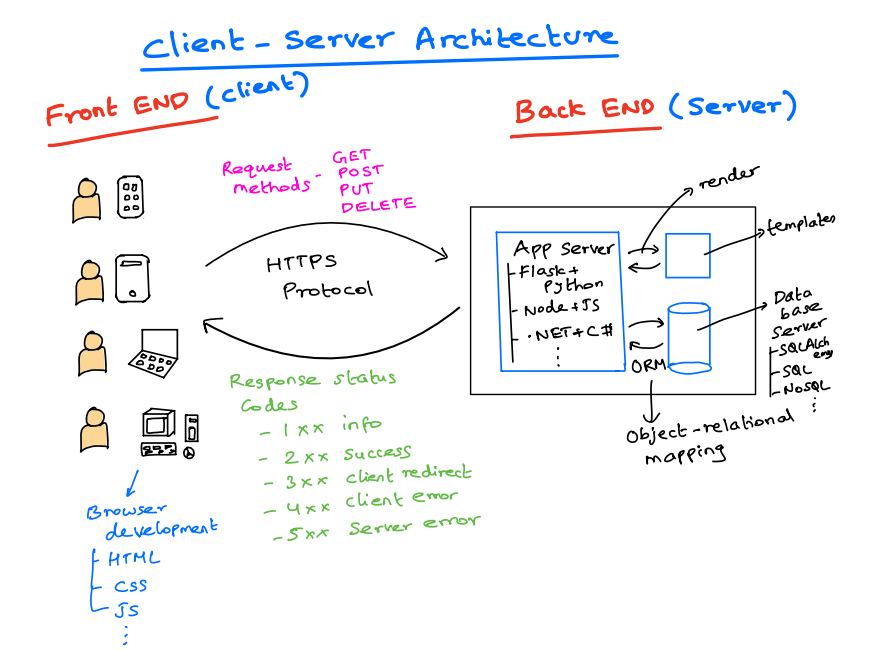
HTTPS (Hypertext Transfer Protocol Secure) is the secure version of HTTP, the protocol used for transferring data over the internet.82 HTTPS achieves security by using an encryption protocol called Transport Layer Security (TLS), which was previously known as Secure Sockets Layer (SSL).82 This encryption protects the data exchanged between a web browser and a web server from being intercepted and read by unauthorized parties.82
HTTPS offers several key benefits. It encrypts all data transmitted, including sensitive information like login credentials and payment details.82 It also authenticates the website, verifying that the user is communicating with the intended server and preventing impersonation or man-in-the-middle attacks.82 The presence of HTTPS, indicated by a padlock icon in the browser's address bar, builds user trust and confidence in the website's security.87 Search engines like Google often rank HTTPS websites higher than those using only HTTP, recognizing the importance of security.86 Furthermore, HTTPS is a prerequisite for many modern browser features and Progressive Web Apps (PWAs).88 It also prevents internet service providers (ISPs) or other intermediaries from injecting unwanted content, such as advertisements, into web pages.88
HTTPS relies on SSL/TLS certificates to establish secure connections.82 A website obtains an SSL/TLS certificate from a Certificate Authority (CA), a trusted third-party organization.105 This certificate contains the website's public key, information about its identity, and the CA's digital signature, which verifies its authenticity.105 When a browser connects to an HTTPS website, the server sends its SSL/TLS certificate to the browser.104 The browser then verifies the certificate, ensuring that it is valid, has not expired, and matches the website's domain name.104 Once the browser trusts the certificate, it uses the public key contained within it to encrypt a secret session key and sends this encrypted key to the server.82 The web server uses its private key, which corresponds to the public key in the certificate, to decrypt the session key.82 This establishes a secure, encrypted connection between the browser and the server using the session key for all subsequent communication.82
Proper configuration of SSL/TLS certificates is crucial for maximizing the security provided by HTTPS. OWASP recommends only supporting strong protocols like TLS 1.2 or 1.3 and disabling older, vulnerable protocols such as SSLv3, TLS 1.0, and TLS 1.1.17 Similarly, only strong cipher suites should be enabled, and weak or insecure ciphers like NULL, anonymous, and EXPORT ciphers should be disabled.17 GCM-mode cipher suites are generally preferred over CBC-mode.79 Setting appropriate Diffie-Hellman groups enables forward secrecy, ensuring that past communication cannot be decrypted even if the server's private key is compromised in the future.91 TLS compression should be disabled to mitigate CRIME attacks, which could potentially allow attackers to recover sensitive information.91 Cryptographic libraries should be patched regularly to address any known vulnerabilities.91 After hardening the server configuration, it should be tested using available tools to ensure it meets security best practices.91 Strong keys (at least 2048-bit RSA or 256-bit ECDSA) should be used when generating certificates, and the corresponding private keys must be protected from unauthorized access.91 Certificates should use strong cryptographic hashing algorithms like SHA-256 or higher.91 The domain name on the certificate must accurately match the website's fully qualified domain name, including both the "www" and non-"www" versions if applicable, and should use the Subject Alternative Name (SAN) attribute.91 The use of wildcard certificates should be carefully considered and limited to situations where truly necessary.91 Selecting an appropriate Certificate Authority trusted by the application's user base is important 91, and using CAA (Certificate Authority Authorization) records can restrict which CAs are allowed to issue certificates for the domain.91 TLS should be used for all pages of the website, not just those handling sensitive information.17 Mixing content served over both HTTPS and HTTP (mixed content) should be avoided.17 The "Secure" flag should be set for cookies to ensure they are only transmitted over HTTPS.17 Caching of sensitive data by the browser should be prevented.91 HTTP Strict Transport Security (HSTS) should be implemented to instruct browsers to always use HTTPS for the domain.30 For high-risk applications, consider implementing Certificate Pinning to further enhance trust by hardcoding expected certificate information.75
The ongoing evolution of TLS reflects the continuous efforts to enhance the security and performance of web communication. Proper certificate management is just as critical as the choice of encryption protocols. Implementing HSTS is a valuable measure for ensuring persistent encryption and preventing downgrade attacks.
Proactive Security Measures: Audits and Testing
To identify and address potential security vulnerabilities before they can be exploited, it is essential to conduct regular security audits and penetration testing of web applications.
Conducting Effective Security Audits for Web Applications
Security audits are systematic assessments of a web application's security posture designed to identify weaknesses and ensure compliance with relevant security policies and regulations.3 These audits can take several forms, each with its own focus and methodology. Vulnerability scans utilize automated tools to quickly identify common security weaknesses in web applications.3 Penetration testing, also known as ethical hacking, involves security professionals simulating real-world cyberattacks to uncover exploitable vulnerabilities and assess the application's resilience.3 Code reviews involve a manual inspection of the application's source code to identify security flaws and ensure adherence to secure coding practices.2 Compliance audits focus on verifying whether the application meets the requirements of relevant industry regulations and standards, such as PCI DSS, HIPAA, and ISO 27001.111 Finally, configuration reviews assess the security of the web server configurations and settings to identify any potential misconfigurations that could be exploited.111
Conducting regular security audits offers numerous benefits. They help identify security vulnerabilities and risks before they can be exploited by attackers 112, thereby protecting sensitive user data 112 and building user trust.112 Audits can also ensure that the application meets legal and regulatory compliance requirements 112, helping to prevent financial losses associated with breaches and fines.112 Furthermore, audits can contribute to improved application performance 112, minimized downtime 112, and enhanced long-term security.112 By proactively addressing emerging threats 114, organizations can improve their overall security posture 112, maintain business continuity 115, and make informed decisions about prioritizing security investments.115
An effective security audit involves several key steps. It begins with defining clear objectives and the scope of the audit.111 The next phase involves gathering relevant information and data about the application and its environment.111 Utilizing reliable audit tools, including vulnerability scanners and analysis platforms, is crucial.111 Conducting vulnerability assessments and penetration testing helps identify exploitable weaknesses 110, while reviewing the application's code and configurations can uncover underlying security flaws.110 The effectiveness of existing security controls should be thoroughly evaluated.117 The findings of the audit should be documented in a clear and comprehensive report, including specific recommendations for remediation.112 Issues should be prioritized based on their severity and potential impact 34, and a detailed remediation plan should be developed to address the identified vulnerabilities.111 Finally, it is essential to follow up on the audit results to ensure that the recommended actions are implemented 111, and audit strategies should be regularly updated to adapt to the evolving threat landscape.111
A combination of automated vulnerability scanning and manual penetration testing offers the most thorough security assessment. Integrating security audits into the software development lifecycle enables early detection and remediation of vulnerabilities. The type and frequency of audits should be tailored to the application's specific risk profile and requirements.
The Value of Penetration Testing in Identifying Vulnerabilities
Penetration testing, often referred to as ethical hacking, is a critical security process that involves simulating real-world cyberattacks on web applications to identify security weaknesses that could be exploited by malicious actors.34 Several methodologies guide the penetration testing process, with the OWASP methodology being a widely recognized framework.34 Other notable methodologies include the Penetration Testing Execution Standard (PTES), the PCI DSS Penetration Testing Guide, NIST 800-115, and the Open Source Security Testing Methodology Manual (OSSTMM).119 Penetration testing can be categorized into different types based on the tester's level of knowledge about the target system, including black box testing (no prior knowledge), white box testing (full access to system information), and grey box testing (limited knowledge).123
The benefits of penetration testing are numerous. It can identify vulnerabilities that automated scans might miss, especially those related to business logic or complex attack vectors.112 By simulating actual attack scenarios, penetration testing provides a clear understanding of the potential impact of security breaches.110 It offers an independent assessment of the effectiveness of existing security controls 121 and helps organizations prioritize security risks and remediation efforts effectively.122 Regular penetration testing is often required for compliance with various regulations, such as PCI DSS and ISO 27001.121 It also contributes to improving security practices throughout the software development lifecycle 121 and supports more informed decision-making regarding future security investments.115 Continuous penetration testing can significantly increase an organization's resilience to cyber threats by enabling proactive identification and mitigation of vulnerabilities.122 At the conclusion of a penetration test, organizations typically receive detailed reports outlining the identified vulnerabilities, their potential impact, and specific recommendations for fixing them.121 Key areas covered during penetration testing often include network vulnerabilities, the effectiveness of security controls, the strength of encryption mechanisms, the security of software systems and architecture, and the security of telecommunication controls 114, with a particular focus on the vulnerabilities listed in the OWASP Top 10.34
Penetration testing goes beyond simply listing vulnerabilities; it demonstrates how these weaknesses can be exploited, providing a tangible understanding of the risks. The availability of different penetration testing methodologies allows organizations to select the approach that best aligns with their specific needs. Integrating continuous penetration testing into the development process enables proactive security and helps organizations stay ahead of evolving threats.
Conclusion: Building a Resilient and Secure Web Application
Securing web applications in today's threat landscape demands a proactive and multi-layered approach. As the digital world continues to evolve, so too do the threats targeting web applications. Therefore, continuous learning and adaptation are essential for maintaining a strong security posture. This report has highlighted several key areas crucial for building resilient and secure web applications. Addressing common vulnerabilities like XSS, SQL injection, and CSRF through rigorous input validation, output encoding, and appropriate defense mechanisms is paramount. Implementing secure authentication and authorization practices, including robust password management, secure session handling, multi-factor authentication, and the principle of least privilege, is fundamental for controlling access to sensitive data and functionality. Ensuring data security through encryption at rest and in transit, as well as the strategic use of tokenization and data masking, provides critical protection for sensitive information. Securing communication channels with properly configured HTTPS is non-negotiable for maintaining user trust and data confidentiality. Finally, the proactive measures of conducting regular security audits and penetration testing are vital for identifying and mitigating vulnerabilities before they can be exploited. By embracing these security best practices as an integral part of the web application development lifecycle, organizations can significantly enhance the resilience and security of their applications, protecting their users, their data, and their reputation.
Works cited
What Is an Application Vulnerability? 8 Common Types - Legit Security, accessed April 2, 2025, https://www.legitsecurity.com/blog/application-vulnerability-common-types
Cross Site Scripting (XSS) | OWASP Foundation - OWASP.org, accessed April 2, 2025, https://owasp.org/www-community/attacks/xss/
What is Cross-site Scripting (XSS): prevention and fixes - Acunetix, accessed April 2, 2025, https://www.acunetix.com/websitesecurity/cross-site-scripting/
What is cross-site scripting (XSS) and how to prevent it? | Web Security Academy, accessed April 2, 2025, https://portswigger.net/web-security/cross-site-scripting
Cross-site scripting - Wikipedia, accessed April 2, 2025, https://en.wikipedia.org/wiki/Cross-site_scripting
Testing for Reflected Cross Site Scripting - OWASP.org, accessed April 2, 2025, https://owasp.org/www-project-web-security-testing-guide/latest/4-Web_Application_Security_Testing/07-Input_Validation_Testing/01-Testing_for_Reflected_Cross_Site_Scripting
Cross Site Scripting Prevention - OWASP Cheat Sheet Series, accessed April 2, 2025, https://cheatsheetseries.owasp.org/cheatsheets/Cross_Site_Scripting_Prevention_Cheat_Sheet.html
OWASP Java HTML Sanitizer, accessed April 2, 2025, https://owasp.org/www-project-java-html-sanitizer/
Session management best practices - Stytch, accessed April 2, 2025, https://stytch.com/blog/session-management-best-practices/
SQL Injection: Types, Examples & Prevention Cheat Sheet - Pynt, accessed April 2, 2025, https://www.pynt.io/learning-hub/owasp-top-10-guide/sql-injection-types-examples-prevention-cheat-sheet
SQL Injection | OWASP Foundation - OWASP.org, accessed April 2, 2025, https://owasp.org/www-community/attacks/SQL_Injection
Injection Prevention - OWASP Cheat Sheet Series, accessed April 2, 2025, https://cheatsheetseries.owasp.org/cheatsheets/Injection_Prevention_Cheat_Sheet.html
What is SQL Injection? Tutorial & Examples | Web Security Academy - PortSwigger, accessed April 2, 2025, https://portswigger.net/web-security/sql-injection
Testing for SQL Injection - OWASP.org, accessed April 2, 2025, https://owasp.org/www-project-web-security-testing-guide/latest/4-Web_Application_Security_Testing/07-Input_Validation_Testing/05-Testing_for_SQL_Injection
Top 10 web application vulnerabilities in 2021–2023 - Securelist, accessed April 2, 2025, https://securelist.com/top-10-web-app-vulnerabilities/112144/
C5: Validate All Inputs - OWASP Top 10 Proactive Controls, accessed April 2, 2025, https://top10proactive.owasp.org/archive/2018/c5-validate-inputs/
OWASP Secure Coding Practices - Quick Reference Guide, accessed April 2, 2025, https://owasp.org/www-project-secure-coding-practices-quick-reference-guide/stable-en/02-checklist/05-checklist
Top 10 Common Web Application Vulnerabilities and Best Practices for Prevention | by Ajay Monga | Medium, accessed April 2, 2025, https://medium.com/@ajay.monga73/top-10-common-web-application-vulnerabilities-and-best-practices-for-prevention-430fc675f273
Common Web Application Vulnerabilities Explained - Rapid7, accessed April 2, 2025, https://www.rapid7.com/fundamentals/web-application-vulnerabilities/
Cross Site Request Forgery (CSRF) | OWASP Foundation, accessed April 2, 2025, https://owasp.org/www-community/attacks/csrf
Cross-Site Request Forgery Guide: Learn All About CSRF Attacks and CSRF Protection, accessed April 2, 2025, https://www.veracode.com/security/cross-site-request-forgery-guide-learn-all-about-csrf-attacks-and-csrf-protection/
Cross-Site Request Forgery Prevention - OWASP Cheat Sheet Series, accessed April 2, 2025, https://cheatsheetseries.owasp.org/cheatsheets/Cross-Site_Request_Forgery_Prevention_Cheat_Sheet.html
Cross-Site Request Forgery (CSRF) - Invicti, accessed April 2, 2025, https://www.invicti.com/learn/cross-site-request-forgery-csrf/
Testing for Cross Site Request Forgery - OWASP.org, accessed April 2, 2025, https://owasp.org/www-project-web-security-testing-guide/latest/4-Web_Application_Security_Testing/06-Session_Management_Testing/05-Testing_for_Cross_Site_Request_Forgery
What is CSRF (Cross-site request forgery) Attacks, Mitigation, Prevention - Acunetix, accessed April 2, 2025, https://www.acunetix.com/websitesecurity/csrf-attacks/
Prevent Cross-Site Request Forgery (XSRF/CSRF) attacks in ASP.NET Core, accessed April 2, 2025, https://learn.microsoft.com/en-us/aspnet/core/security/anti-request-forgery?view=aspnetcore-9.0
Understanding CSRF Attacks: Risk Analysis, Protection & Anti-CSRF Tokens - Indusface, accessed April 2, 2025, https://www.indusface.com/blog/how-to-protect-your-web-apps-using-anti-csrf-tokens/
Prevent Cross-Site Request Forgery (CSRF) attacks | Veracode Docs, accessed April 2, 2025, https://docs.veracode.com/r/cross-site-request-forgery
How To Prevent CSRF Attacks by Using Anti-CSRF Tokens - Invicti, accessed April 2, 2025, https://www.invicti.com/blog/web-security/protecting-website-using-anti-csrf-token/
10 Session Management Security Best Practices - Endgrate, accessed April 2, 2025, https://endgrate.com/blog/10-session-management-security-best-practices
Cross-Site Request Forgery (CSRF) Examples and Prevention - Wiz, accessed April 2, 2025, https://www.wiz.io/academy/cross-site-request-forgery-csrf
Cross-site request forgery (CSRF) prevention - Security on the web | MDN, accessed April 2, 2025, https://developer.mozilla.org/en-US/docs/Web/Security/Practical_implementation_guides/CSRF_prevention
Cross Site Request Forgery (CSRF) :: Spring Security, accessed April 2, 2025, https://docs.spring.io/spring-security/reference/features/exploits/csrf.html
A Comprehensive Guide to OWASP Penetration Testing - Astra Security, accessed April 2, 2025, https://www.getastra.com/blog/security-audit/owasp-penetration-testing/
Breaking Down OWASP Top 10 for Web Apps, Mobile, API, K8s & LLMs - Oligo Security, accessed April 2, 2025, https://www.oligo.security/academy/breaking-down-owasp-top-10-for-web-apps-mobile-api-k8s-and-llms
Password Storage - OWASP Cheat Sheet Series, accessed April 2, 2025, https://cheatsheetseries.owasp.org/cheatsheets/Password_Storage_Cheat_Sheet.html
Password Hashing & Salting - Function and Algorithm Explained - Authgear, accessed April 2, 2025, https://www.authgear.com/post/password-hashing-salting-function-and-algorithm-explained
OWASP Node.js Authentication, Authorization and Cryptography Practices, accessed April 2, 2025, https://www.nodejs-security.com/blog/owasp-nodejs-authentication-authorization-cryptography-practices
Password Storage · OWASP Cheat Sheet Series - DeteAct, accessed April 2, 2025, https://owasp.deteact.com/cheat/cheatsheets/Password_Storage_Cheat_Sheet.html
Cryptographic Storage · OWASP Cheat Sheet Series - DeteAct, accessed April 2, 2025, https://owasp.deteact.com/cheat/cheatsheets/Cryptographic_Storage_Cheat_Sheet.html
Session management best practices - WorkOS, accessed April 2, 2025, https://workos.com/blog/session-management-best-practices
How Session Management Works and Why It's Important - Ping Identity, accessed April 2, 2025, https://www.pingidentity.com/en/resources/blog/post/session-management.html
What Is Session Management & Tips to Do It Securely - Descope, accessed April 2, 2025, https://www.descope.com/learn/post/session-management
Token-based Authentication and JWTs (JSON Web Tokens) - SWE Quiz, accessed April 2, 2025, https://www.swequiz.com/learn/token-based-auth-jwt-json-web-tokens
Election Security Spotlight – Multi-Factor Authentication, accessed April 2, 2025, https://www.cisecurity.org/insights/spotlight/ei-isac-cybersecurity-spotlight-multi-factor-authentication
Top 10 Multi Factor Authentication Best Practices: Essential Tips for MFA, accessed April 2, 2025, https://cybersecurity.asee.io/blog/multi-factor-authentication-mfa-best-practices/
8 Multi-Factor Authentication (MFA) Types: A Complete Overview - Frontegg, accessed April 2, 2025, https://frontegg.com/blog/multi-factor-authentication-types
Multifactor Authentication - OWASP Cheat Sheet Series, accessed April 2, 2025, https://cheatsheetseries.owasp.org/cheatsheets/Multifactor_Authentication_Cheat_Sheet.html
Deployment considerations for Microsoft Entra multifactor authentication, accessed April 2, 2025, https://learn.microsoft.com/en-us/entra/identity/authentication/howto-mfa-getstarted
Exploring Access Control, MFA and the Principle of Least Privilege - CYRISMA, accessed April 2, 2025, https://cyrisma.com/exploring-access-control-mfa-and-the-principle-of-least-privilege/
How are jwt token professionally used to authenticate on a website.I have used only one token which I store and expire every 24 hours. : r/node - Reddit, accessed April 2, 2025, https://www.reddit.com/r/node/comments/1dn5dry/how_are_jwt_token_professionally_used_to/
JSON Web Tokens - Auth0, accessed April 2, 2025, https://auth0.com/docs/secure/tokens/json-web-tokens
What is a JWT? Understanding JSON Web Tokens - SuperTokens, accessed April 2, 2025, https://supertokens.com/blog/what-is-jwt
What is an Authentication Token? A Detailed Review - Frontegg, accessed April 2, 2025, https://frontegg.com/blog/token-based-authentication
Access Control | OWASP Foundation, accessed April 2, 2025, https://owasp.org/www-community/Access_Control
Secure Product Design - OWASP Cheat Sheet Series, accessed April 2, 2025, https://cheatsheetseries.owasp.org/cheatsheets/Secure_Product_Design_Cheat_Sheet.html
Authorization - OWASP Cheat Sheet Series, accessed April 2, 2025, https://cheatsheetseries.owasp.org/cheatsheets/Authorization_Cheat_Sheet.html
What Is the Principle of Least Privilege? - Palo Alto Networks, accessed April 2, 2025, https://www.paloaltonetworks.com/cyberpedia/what-is-the-principle-of-least-privilege
Understanding the Principle of Least Privilege (PoLP) - Legit Security, accessed April 2, 2025, https://www.legitsecurity.com/blog/what-is-the-principle-of-least-privilege-polp
What you need to know about NIST 800-53, least privilege, and PAM, accessed April 2, 2025, https://delinea.com/blog/nist-800-53-security-privacy-privileged-access
Principle of Least Privilege Examples | With Diagrams - Delinea, accessed April 2, 2025, https://delinea.com/blog/principle-of-least-privilege-examples
Role-based Access Control - NIST Computer Security Resource Center, accessed April 2, 2025, https://csrc.nist.gov/CSRC/media/Presentations/Role-based-Access-Control/images-media/Role-based%20Access%20Control2.pdf
AC.L2-3.1.5 Least Privilege - DIB SCC CyberAssist - ND-ISAC, accessed April 2, 2025, https://ndisac.org/dibscc/cyberassist/cybersecurity-maturity-model-certification/level-2/ac-l2-3-1-5/
Input Validation - OWASP Cheat Sheet Series, accessed April 2, 2025, https://cheatsheetseries.owasp.org/cheatsheets/Input_Validation_Cheat_Sheet.html
Input Validation · OWASP Cheat Sheet Series - DeteAct, accessed April 2, 2025, https://owasp.deteact.com/cheat/cheatsheets/Input_Validation_Cheat_Sheet.html
OWASP Developer Guide | Validate All Inputs Checklist, accessed April 2, 2025, https://owasp.org/www-project-developer-guide/draft/design/web_app_checklist/validate_inputs/
How to Use Input Sanitization to Prevent Web Attacks - eSecurity Planet, accessed April 2, 2025, https://www.esecurityplanet.com/endpoint/prevent-web-attacks-using-input-sanitization/
Input Validation and Sanitization: Protecting Your Application from Malicious Input - Medium, accessed April 2, 2025, https://medium.com/@use.abhiram/input-validation-and-sanitization-protecting-your-application-from-malicious-input-28fee92ea0d3
Input Validation and Data Sanitization, accessed April 2, 2025, https://wiki.sei.cmu.edu/confluence/display/java/Input+Validation+and+Data+Sanitization
what is the difference between sanitizing and validation in php? - Stack Overflow, accessed April 2, 2025, https://stackoverflow.com/questions/32577959/what-is-the-difference-between-sanitizing-and-validation-in-php
What's the difference between escaping, filtering, validating and sanitizing?, accessed April 2, 2025, https://security.stackexchange.com/questions/143923/whats-the-difference-between-escaping-filtering-validating-and-sanitizing
input sanitization VS validation - php - Stack Overflow, accessed April 2, 2025, https://stackoverflow.com/questions/17473586/input-sanitization-vs-validation
What is OWASP? What is the OWASP Top 10? - Cloudflare, accessed April 2, 2025, https://www.cloudflare.com/learning/security/threats/owasp-top-10/
Web Service Security - OWASP Cheat Sheet Series, accessed April 2, 2025, https://cheatsheetseries.owasp.org/cheatsheets/Web_Service_Security_Cheat_Sheet.html
User Privacy Protection - OWASP Cheat Sheet Series, accessed April 2, 2025, https://owasp.org/index.php/User_Privacy_Protection_Cheat_Sheet
M9: Insecure Data Storage | OWASP Foundation, accessed April 2, 2025, https://owasp.org/www-project-mobile-top-10/2023-risks/m9-insecure-data-storage
General encryption best practices - AWS Prescriptive Guidance, accessed April 2, 2025, https://docs.aws.amazon.com/prescriptive-guidance/latest/encryption-best-practices/general-encryption-best-practices.html
Data At Rest Encryption: 6 Best Practices For Data Security - RedSwitches, accessed April 2, 2025, https://www.redswitches.com/blog/data-at-rest-encryption/
Data Encryption Best Practices - LMG Security, accessed April 2, 2025, https://www.lmgsecurity.com/data-encryption-best-practices/
Data Encryption: Securing Data at Rest and in Transit with Encryption Technologies - DEV Community, accessed April 2, 2025, https://dev.to/documatic/data-encryption-securing-data-at-rest-and-in-transit-with-encryption-technologies-1lc2
Data Encryption: Top 7 Algorithms and 5 Best Practices. - Satori Cyber, accessed April 2, 2025, https://satoricyber.com/data-masking/data-encryption-top-7-algorithms-and-5-best-practices/
What is SSL/TLS Encryption? - F5, accessed April 2, 2025, https://www.f5.com/glossary/ssl-tls-encryption
Securing Data in Transit With Encryption: The Ultimate Guide - TitanFile, accessed April 2, 2025, https://www.titanfile.com/blog/data-in-transit-encryption/
Encryption in transit | Documentation - Google Cloud, accessed April 2, 2025, https://cloud.google.com/docs/security/encryption-in-transit
encryption-in-transit-whitepaper.pdf - Google Cloud, accessed April 2, 2025, https://cloud.google.com/docs/security/encryption-in-transit/resources/encryption-in-transit-whitepaper.pdf
HTTP vs HTTPS - Difference Between Transfer Protocols - AWS, accessed April 2, 2025, https://aws.amazon.com/compare/the-difference-between-https-and-http/
Why use HTTPS? | Cloudflare, accessed April 2, 2025, https://www.cloudflare.com/learning/ssl/why-use-https/
Why HTTPS matters | Articles - web.dev, accessed April 2, 2025, https://web.dev/articles/why-https-matters
What is HTTPS? | Cloudflare, accessed April 2, 2025, https://www.cloudflare.com/learning/ssl/what-is-https/
What is HTTPS? How it Works and Why It's So Important | UpGuard, accessed April 2, 2025, https://www.upguard.com/blog/what-is-https
Transport Layer Security - OWASP Cheat Sheet Series, accessed April 2, 2025, https://cheatsheetseries.owasp.org/cheatsheets/Transport_Layer_Security_Cheat_Sheet.html
Best Practices - Transport Layer Security - Okta Developer, accessed April 2, 2025, https://developer.okta.com/books/api-security/tls/best-practices/
SSL/TLS Best Practices for 2023, accessed April 2, 2025, https://www.ssl.com/guide/ssl-best-practices/
Email encryption in transit - Google Transparency Report, accessed April 2, 2025, https://transparencyreport.google.com/safer-email/overview
Get started with built-in tokenization for sensitive data protection | Google Cloud Blog, accessed April 2, 2025, https://cloud.google.com/blog/products/identity-security/get-started-with-built-in-tokenization-for-sensitive-data-protection
What is Tokenization | Data & Payment Tokenization Explained - Imperva, accessed April 2, 2025, https://www.imperva.com/learn/data-security/tokenization/
The Ultimate Guide to Data Tokenization (and Encryption) - Baffle.io, accessed April 2, 2025, https://baffle.io/data-tokenization/
What Is Data Tokenization? Key Concepts and Benefits - Digital Guardian, accessed April 2, 2025, https://www.digitalguardian.com/blog/what-data-tokenization-key-concepts-and-benefits
Data Tokenization Solutions | Use Cases - Fortanix, accessed April 2, 2025, https://www.fortanix.com/solutions/data-encryption/tokenization
What is Data Masking? - Static and Dynamic Data Masking Explained - AWS, accessed April 2, 2025, https://aws.amazon.com/what-is/data-masking/
What Is Data Masking? Definition & Techniques | Proofpoint US, accessed April 2, 2025, https://www.proofpoint.com/us/threat-reference/data-masking
Data Masking: 8 Techniques and How to Implement Them Successfully - Satori Cyber, accessed April 2, 2025, https://satoricyber.com/data-masking/data-masking-8-techniques-and-how-to-implement-them-successfully/
What is Data Masking? Types & Techniques - Rapid7, accessed April 2, 2025, https://www.rapid7.com/fundamentals/data-masking/
What is SSL/TLS Certificate? - AWS - Amazon.com, accessed April 2, 2025, https://aws.amazon.com/what-is/ssl-certificate/
What is an SSL certificate? - Cloudflare, accessed April 2, 2025, https://www.cloudflare.com/learning/ssl/what-is-an-ssl-certificate/
What is an SSL Certificate? SSL vs TLS & More - Sectigo, accessed April 2, 2025, https://www.sectigo.com/resource-library/what-is-an-ssl-certificate
aws.amazon.com, accessed April 2, 2025, https://aws.amazon.com/what-is/ssl-certificate/#:~:text=The%20browser%20verifies%20the%20SSL,contains%20a%20secret%20session%20key.
What are TLS/SSL Certificates and Why do We Need Them? - DigiCert, accessed April 2, 2025, https://www.digicert.com/tls-ssl/tls-ssl-certificates
How TLS/SSL Certificates Work - DigiCert, accessed April 2, 2025, https://www.digicert.com/how-tls-ssl-certificates-work
What Is a Web Application Security Assessment? (And Other FAQs) - Warren Averett, accessed April 2, 2025, https://warrenaverett.com/insights/web-application-security-assessment/
What Is A Web Application Audit? - IT Auditor Training Course, accessed April 2, 2025, https://audit.guru/what-is-a-web-application-audit/
Application Security Audit Guide 2024: Everything You Need - Qualysec, accessed April 2, 2025, https://qualysec.com/application-security-audit-services/
6 Types of Security Audits - SentinelOne, accessed April 2, 2025, https://www.sentinelone.com/cybersecurity-101/cybersecurity/types-of-security-audits/
What Are Security Audits? - Types, Process & Checklist, accessed April 2, 2025, https://www.getastra.com/blog/security-audit/security-audits/
8 Benefits of Security Audits - SentinelOne, accessed April 2, 2025, https://www.sentinelone.com/cybersecurity-101/cybersecurity/benefits-of-security-audits/
Importance of Regular Security Audit and Penetration Testing - Apprise Cyber, accessed April 2, 2025, https://apprise-cyber.com/blog/benefits-of-security-audit-and-pentesting/
Industry News 2024 Six Benefits of a Cybersecurity Audit - ISACA, accessed April 2, 2025, https://www.isaca.org/resources/news-and-trends/industry-news/2024/six-benefits-of-a-cybersecurity-audit
OWASP Methodology Security Testing Phases - Sapphire.net, accessed April 2, 2025, https://www.sapphire.net/blogs-press-releases/owasp-methodology/
Penetration Testing Methodologies - OWASP.org, accessed April 2, 2025, https://owasp.org/www-project-web-security-testing-guide/latest/3-The_OWASP_Testing_Framework/1-Penetration_Testing_Methodologies
Penetration Testing Methodologies - OWASP/wstg - GitHub, accessed April 2, 2025, https://github.com/OWASP/wstg/blob/master/document/3-The_OWASP_Testing_Framework/1-Penetration_Testing_Methodologies.md
A Guide to OWASP Penetration Testing - Redscan, accessed April 2, 2025, https://www.redscan.com/news/what-is-owasp-penetration-testing/
Why Is It Important To Continiously Conduct Penetration Testing For A Strong Security System? - TechMagic, accessed April 2, 2025, https://www.techmagic.co/blog/importance-of-penetration-testing
Penetration Testing vs. Compliance Audits: What's the Difference? | Scytale, accessed April 2, 2025, https://scytale.ai/resources/penetration-testing-vs-compliance-audits-whats-the-difference/